


Over the past few years, VRAM requirements in games have been going through the roof. From higher resolution textures to increased geometry and ray tracing, there are numerous reasons to explain this phenomenon. And obviously, one solution is pretty straightforward: give GPUs more VRAM.
The obvious problem there is that VRAM is still RAM. And with memory prices currently doing their best impression of a crypto chart, simply slapping more of it onto every GPU gets expensive fast. Luckily, both AMD and Nvidia are working on new tech to help solve this problem. Plus we have more info on AMD’s next generation GPUs and Zen 6.
AMD Just Cut VRAM Usage By 98%
AMD recently announced a breakthrough technology that massively reduces the amount of GPU memory needed for ray tracing. It’s called tetrahedral cages, and it helps to fix a pretty major bottleneck in ray tracing.
See, ray tracing relies on structures called BVHs to help the GPU quickly figure out what a ray can potentially hit. The problem comes when extremely complicated objects start moving. Imagine a huge forest. Every tree has branches. Every branch has leaves. And every leaf could be bending independently in the wind. With a conventional approach, all of that deforming geometry means the GPU has to update huge amounts of acceleration-structure data every single frame. Now imagine doing that for tens of thousands of plants at a time.
So AMD’s solution is to wrap each object in a much simpler cage made of tetrahedrons. That way, the cage does the deforming while the much more detailed geometry and its BVH can stay static and be reused.
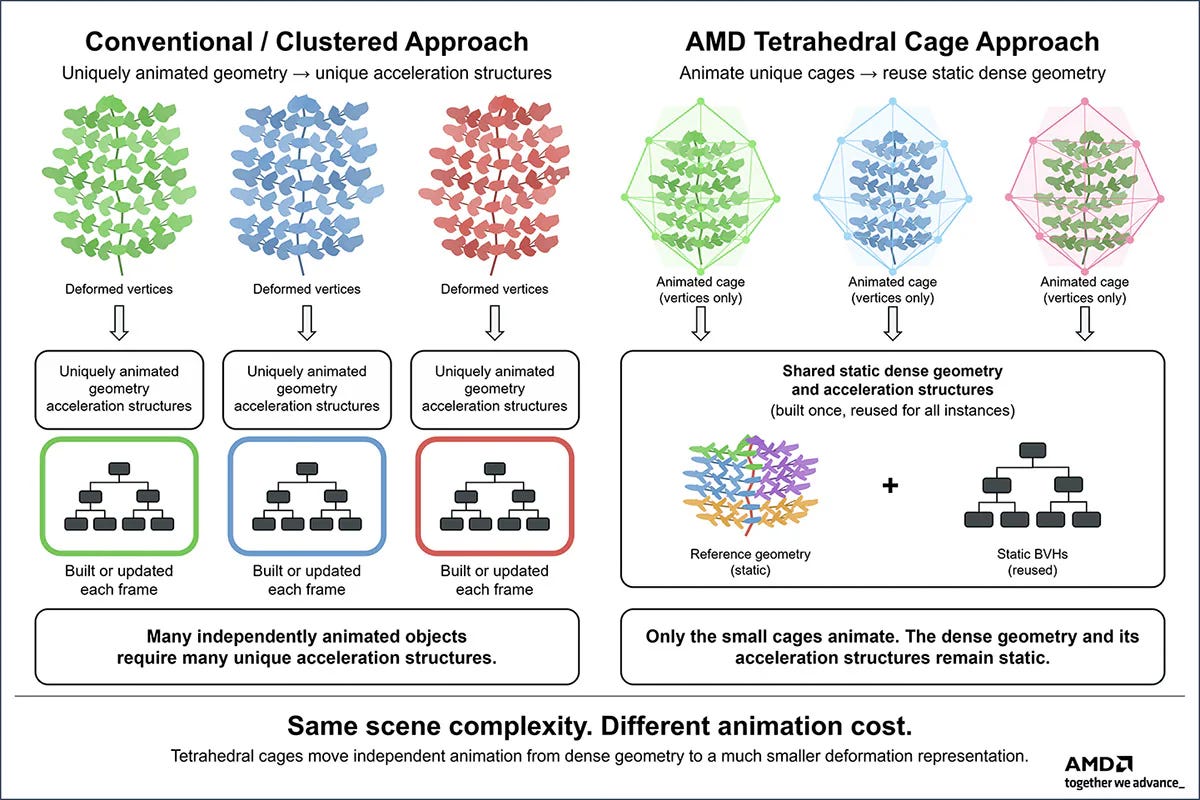
And it works! Really well. Because in AMD’s demo, they used roughly 25,000 independently animated plants, and at its highest detail, it contained roughly 2.8 BILLION triangles. Even after level of detail (LOD) scaling, AMD claims that the GPU was still dealing with around 500 million animated triangles every frame.
Originally, the demo took as much as 80GB of memory. But when they used tetrahedral cages, that number dropped to a mere 1.7GB of memory. And memory wasn’t even the only thing that improved. Updating all of the structures the normal way took more than 300 milliseconds per frame. Yet with AMD’s new method, that dropped to just 3.3 milliseconds. That’s right around a 90X reduction in update time!

In fact, despite ray tracing roughly half a billion animated triangles, AMD was able to run the demo at over 60 FPS at 1080p on a 9070 XT.
Now, this is of course a best case scenario for the tech. AMD intentionally used a ton of foliage, though it’s also something that could happen in a game. Just don’t expect a 98% VRAM reduction in every game. This is specifically meant to help in scenarios with huge amounts of moving geometry. Think forests, grass, crowds or really anything with thousands of detailed objects that are constantly moving.
Nvidia Found A Different Solution
Not too long after AMD announced their new tech, Nvidia released RTX Mega Geometry 2.0. And while this does focus on VRAM usage, it solves a very different problem than AMD’s tech. While AMD addresses how much memory it takes to ray trace a ton of animated geometry, Mega Geometry 2.0 tackles what happens when the scene’s geometry is simply too large to fit in VRAM in the first place.
For those who don’t know, the original Mega Geometry essentially broke down 3D objects into tiny clusters of triangles and scaled down or up the detail depending on how far or close you are. But in 2.0, Nvidia adds support for streaming those clusters of triangles. Basically, the source geometry for the entire scene no longer has to fit inside your GPU’s VRAM. Instead, developers can establish a memory budget. And if the full-detail scene would exceed it, Mega Geometry 2.0 can instantly load the lower detailed clusters into VRAM. Specifically, it can lower the detail in areas where you’re unlikely to even notice the difference, like objects far off in the distance. And it can both raise and lower details on the fly, while you’re gaming.
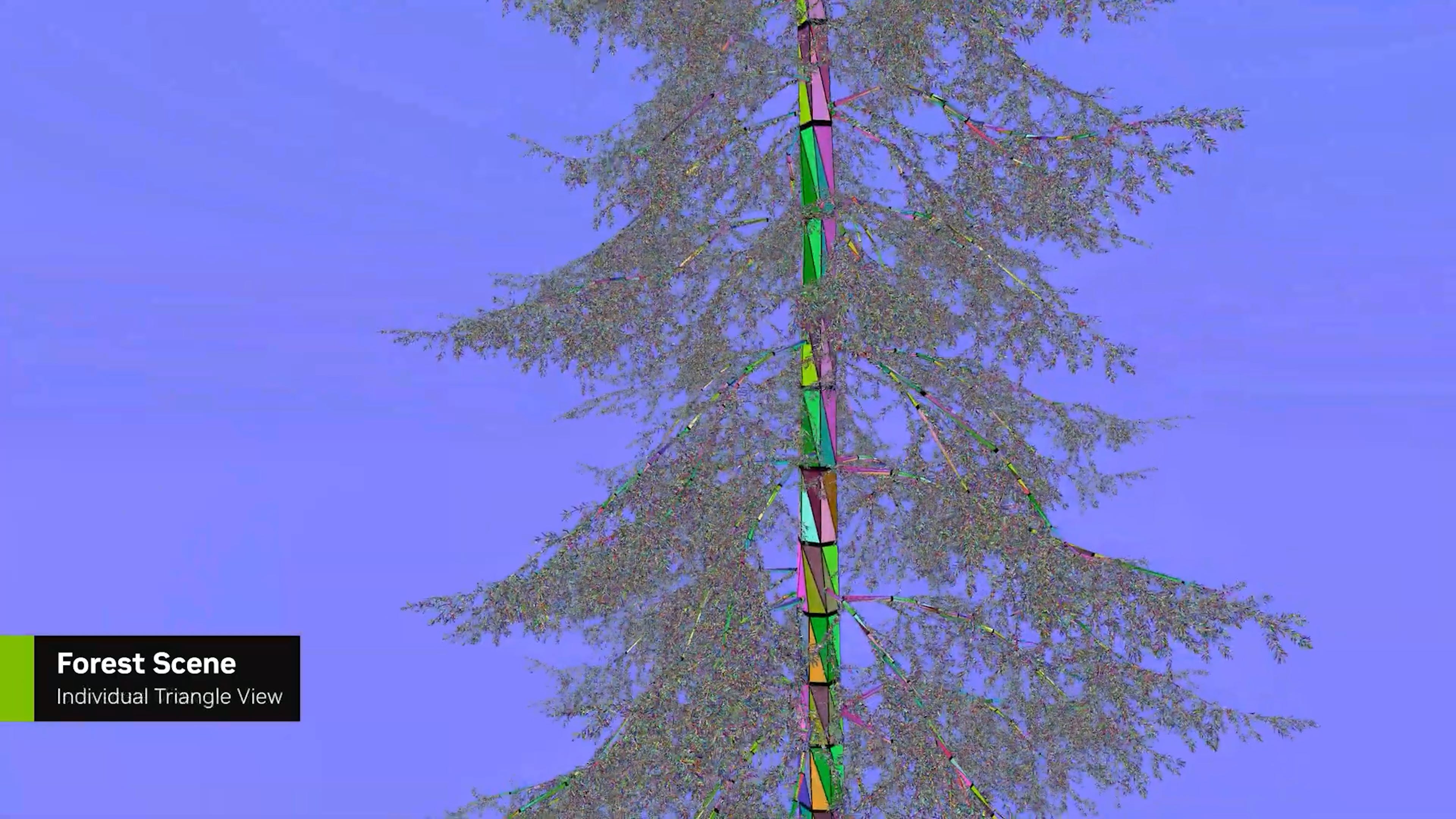
And unlike AMD’s tetrahedral cages, which is currently just promising research, Nvidia’s Mega Geometry 2.0 is already being used with Nanite ray tracing in Gears of War: E-Day. With that said, just like AMD’s tech, this is a solution to VRAM usage in ray traced games. Of course, more and more games are using ray tracing, so both of these new technologies will likely be useful in a ton of games.
With that said, it’s important to keep in mind that developers have three choices here. They can use these memory savings to lower how much VRAM a game needs, or they can spend that extra headroom on higher-detail assets, denser environments etc. So instead of a game dropping from 12GB of VRAM usage to 8GB, developers could simply keep it at 12GB and make the game look significantly better. Or they can do a mixture of both.
The good news is that Mega Geometry 2.0 can simply load in the less detailed assets until you have enough VRAM. Though keep in mind that it can only load the lowest detailed assets that the developers make.
No matter what happens, it’s great to see software solutions to major hardware problems. And hopefully these will help to slow how quickly VRAM requirements continue to climb in future games.
AMD’s Next GPU Could Be Absolutely Massive
AMD’s next-generation gaming GPU is starting to sound ridiculous. Leaks have claimed that the company’s highest-end AT0 GPU could come with as many as 154 Compute Units.
That’s roughly 2.4 times the CU count of the RX 9070 XT.
And until recently, there was a pretty logical explanation for how AMD could possibly build something that large: Break it into pieces.
Well, originally, the well known leaker, Kepler_L2 believed that AMD would split the actual shaders across multiple dies in a chiplet design. Meaning this would be a real multi-chip module, where you essentially have two different GPUs in one. Think AMD’s Ryzen processors.
As I’ve mentioned in the past, MCM designs are incredible for a couple of reasons. First, it makes scaling up much easier. It’s how AMD is able to continuously up their core count. And second, the larger a single chip becomes, the more likely it is that some defect ruins part of it, which can make those massive dies incredibly expensive to manufacture. By splitting that design across multiple smaller chiplets, AMD can get better yields, reuse working dies more efficiently, and ultimately build much larger processors without the cost spiraling out of control.
Unfortunately, that isn’t what AMD did.
As Kepler_L2 later points out, AMD’s own Linux driver now points in a very different direction. In a new AMDGPU patch, AMD adds support for Graphics Core 13. And buried inside the code, AMD literally defines the maximum number of AIDs as one and the maximum number of XCDs per AID as… also one.
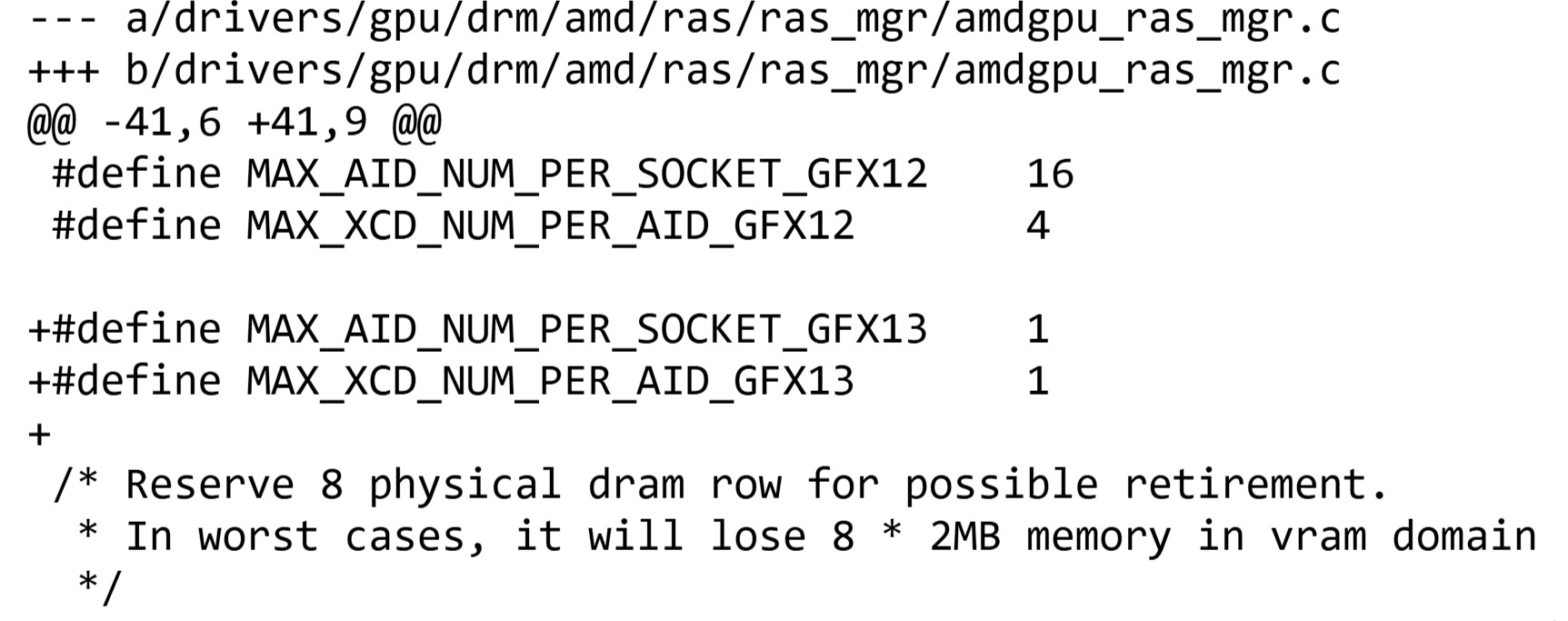
Kepler subsequently corrected his earlier theory and said the GPU appears to use one MID, one AID and one XCD.
MID - Handles things like multimedia and I/O.
AID - Houses things such as cache and memory controllers.
XCD - This is the actual shader hardware.
Basically, if that rumored 154-CU configuration turns out to be accurate, AMD could be putting those shaders onto one enormous compute die. It would technically still be a multi-chip-module GPU. Just not in the way we originally expected. Think more of what AMD did with RDNA 3.
Zen 6 Pricing And Specs Are In
AMD has officially published the full lineup and pricing for their EPYC 9006 Venice processors. And while I typically focus on the consumer lineup of chips, this is our best look yet at just how far AMD is pushing Zen 6.
The full family includes a whopping 31 processors, ranging from an 8 core EPYC 9016 for $700 all the way up to their monster EPYC 9996 with 256 cores and 512 threads for a whopping $14,904. That makes it AMD’s highest core-count EPYC processor yet, up from a maximum of 192 cores with the previous Zen 5 generation.
And AMD isn’t just throwing more cores at it. Venice is built around its new Zen 6 architecture, with the flagship platform supporting as many as 16 memory channels, 1.6 TB/s of maximum memory bandwidth, and PCIe 6.0. There are also separate versions of Venice designed around different workloads, including higher-frequency chips with fewer cores and dense models that push all the way to that 256 core maximum.
Of course, a lot of people are likely still stuck on that near $15,000 price tag, and I don’t blame you. But to keep things in perspective, I looked back when AMD first released their EPYC processors. And that same year, Intel launched their Skylake Xeon Scalable CPUs. Their highest end model was a 28 core, 56 thread CPU called the Platinum 8180M. And this then went for around $13,000!
Now, before you tell me how much tech has changed, keep in mind that we’ve had some pretty terrible inflation since then. So in less than 10 years, we’ve gone form a 28 core CPU for $13,000 to a 256 core CPU for around $15,000. That’s honestly not bad at all. And if you think that Intel would be priced anywhere near that with a 256 core CPU without AMD, I’ve got a house in great shape that you need to see.
Quick Bytes
RTX 5070 Ti Memory Hit 39Gbps
Someone pushed the GDDR7 on an RTX 5070 Ti from 28Gbps to 39Gbps, increasing theoretical bandwidth by roughly 39%. Unfortunately, Cyberpunk only gained around five or six FPS, because apparently even a 39% bandwidth increase can’t fix everything.
China’s New GPU Got A Huge Driver Update
Lisuan just released a driver with 67 listed changes, including 34 fixes and 33 game optimizations for its LX 7G100. Some of those optimized games were used in the early reviews where the card performed terribly, so I definitely want to see this thing retested.
192GB Of Memory Will Cost You
Framework’s new Ryzen AI Max+ PRO 495 Desktop can be configured with 192GB of LPDDR5X memory, but the DIY version starts at $6,799. So yes, you can finally give an integrated GPU a ridiculous amount of memory. You just may need to sell your soul to afford it.
Windows 11 26H2 Is Here
Microsoft has started rolling out Windows 11 26H2, and thankfully it’s a pretty small update for systems already running an updated version of 24H2 or 25H2. It arrives through an enablement package and should only require a single restart, which by Windows standards is basically a miracle.
That’s all the bytes for this week.
Until next time, may your VRAM be plentiful, your memory prices come back to Earth, and your 8GB GPU make it just one more generation.